Abotts Partners with singapore based tech giant to help migrate their public sector customer from Sybase to SQL server.
Abotts partners with NYPL to integrate with their partner libraries.
ABOTTS partners with County in Los Angeles to upgrade their court infrastructure.
Upworks Inc partners with ABOTTS to build their Oracle Cloud Infrastructure (OCI).
Abotts partners with startup to manage and maintain their IT infrastructure and support SOC2 reporting.
Abotts Inc Partners with Gnorth consulting to deploy exadata and ODA.
Abotts Partners with singapore based tech giant to help migrate their public sector customer from Sybase to SQL server.
Abotts partners with NYPL to integrate with their partner libraries.
ABOTTS partners with County in Los Angeles to upgrade their court infrastructure.
Upworks Inc partners with ABOTTS to build their Oracle Cloud Infrastructure (OCI).
Abotts partners with startup to manage and maintain their IT infrastructure and support SOC2 reporting.
Abotts Inc Partners with Gnorth consulting to deploy exadata and ODA.
How to Restore an OpenEdge Database from Backup
How To Restore OpenEdge DB From Backup
1. Take the progress openedge backup from source by using below command
Offline backup:
Stop the db
Run the proenv
Navigate to db path
Run probkup gfa gfa date bak
Online Backup:
Run the proeny
Navigate to db path
Run probkup online gfa gfa date bak
2. Copy the backup file into the destination db server.
3. Login to Destination db and Restore the progress open edge db from source
backup
Stop the OpenEdge db service.
Run the proenv
Navigate to db path
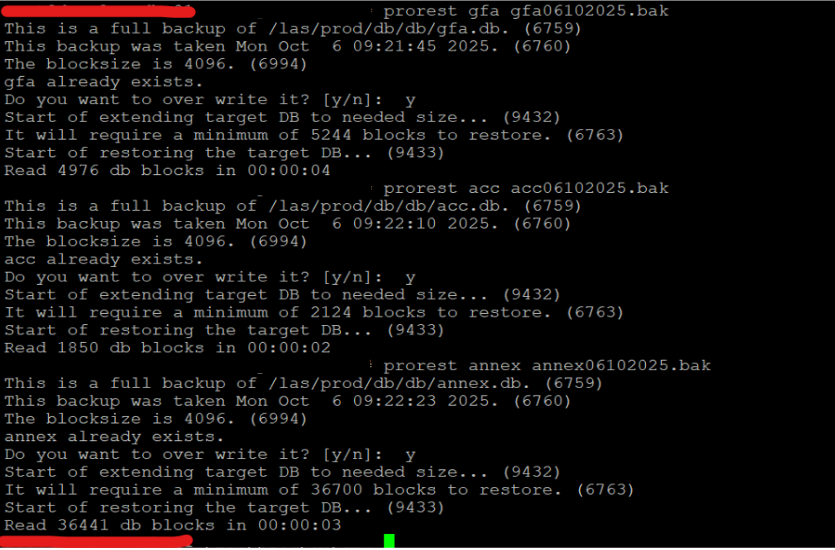
Run prorest gfa gfa_06102025.bak
Restart the database once the restore is completed.
 Abotts partners with NYPL to integrate with their partner libraries.
 Upworks Inc partners with ABOTTS to build their Oracle Cloud Infrastructure (OCI).
 Abotts Inc Partners with Gnorth consulting to deploy exadata and ODA.